Model portfolio website: what to include so agencies and clients book you
What agencies and clients look for on a model portfolio website: which photos and how many, digitals, stats, representation and booking, plus mistakes to avoid.
· 5 min read
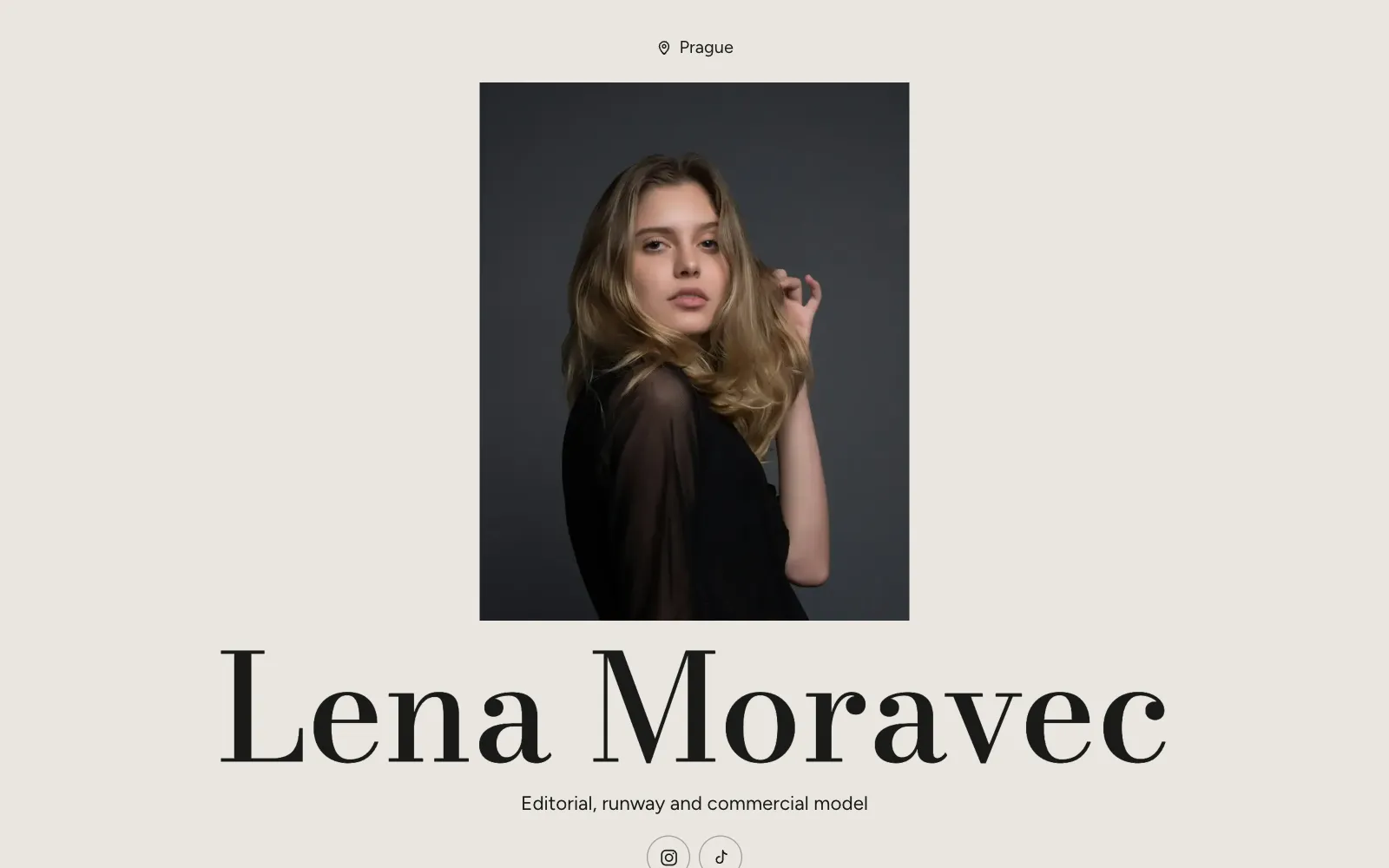
A model portfolio website does one job: it lets a booker, casting director or client decide in under a minute whether you are right for a job, and then contact you. Everything on the page should serve that decision. Strong photos, current digitals, accurate stats and an obvious way to get in touch matter far more than clever design.
This guide covers what agencies and clients look for, which photos to include and how many, how to show your measurements and representation, and the mistakes that quietly cost models work.
What agencies and clients look for
People who book models look at a lot of pages, usually on a phone, often between other tasks. They are checking a short list of things:
- Your look, today. Recent photos that match how you look now, not three years ago.
- Range. Whether you can do the kind of work they are casting: editorial, commercial, fitness, runway, beauty.
- Your stats. Height and sizes, so they can shortlist without asking.
- Where you are and who represents you. Your city, the markets you work in, and the agency to call.
- How to book you. One clear contact route, visible without hunting.
If a scout or client cannot find these in one scroll, many will simply move on to the next name.
Which photos to include, and how many
Your portfolio is an edit, not an archive. A booker judges you by your weakest image as much as your strongest, so cut anything that is blurry, dated or off-brand.
How many
There is no official number, but a focused set of roughly 10 to 20 images is easier to take in than a long scroll. If you work in several areas, it is better to have a few tight groups than one big mix.
What a good edit covers
- A clear headshot as your cover image, face visible, eyes sharp.
- At least one full-length shot that shows your proportions.
- Editorial work that shows mood and movement.
- Commercial work where you look approachable and natural.
- Anything specialist you are booked for: beauty close-ups, swimwear, fitness, hands.
Sequencing
Open with your strongest image, then alternate close and full-length shots so the page has rhythm. Group by category (Editorial, Commercial, Runway) so a client casting a catalogue can skip straight to what they need. On UniPage, the Gallery section can filter by category, and the AI Editor can sort your photos into categories for you.
Digitals and polaroids
Digitals (often still called polaroids) are the photos agencies trust most, because they are not styled or retouched. They show your skin, hair, shape and proportions as they are today.
A standard set usually includes:
- Front headshot, with and without a smile
- Profile headshot, both sides if possible
- Full-length front, side and back
- Plain, fitted clothes, such as a black top and jeans, or swimwear if your agency asks for it
- Little or no make-up, hair down and off the face
- Plain background and soft daylight
Keep digitals separate from your portfolio so they are not confused with editorial work, and update them whenever your hair, weight or look changes. UniPage has a dedicated Digitals section for exactly this: plain polaroids set apart for castings.
Measurements, representation and contact
Your stats
Put your measurements in a short, scannable block rather than a sentence. Most clients expect height, bust or chest, waist, hips, dress or suit size, shoe size, hair colour and eye colour. Give both metric and imperial if you work across markets, and be precise: an inflated height wastes everyone’s time at the fitting.
| Stat | Why it matters |
|---|---|
| Height | The first filter for most fashion and runway castings |
| Bust, waist, hips | Sample sizes and fittings |
| Dress or suit size, shoe size | Wardrobe can be prepared before the shoot |
| Hair and eye colour | Quick shortlisting for specific briefs |
| Location | Travel costs and availability |
Representation
If you are signed, list each agency with its city: your mother agency and any placement agencies in other markets. Link to their page for you. This tells clients you are professional and tells them who to call. If you are freelance, say so plainly, and say which cities you work in.
A booking form
An email address on its own invites vague messages. A short inquiry form can ask for the details you need every time: the client, the date, the location, the type of job, usage and budget. If you are represented, you can point direct inquiries to your agency instead, or ask them which jobs you may take directly.
Common mistakes on model portfolio websites
- Too many photos. Ten great images beat forty average ones. Every extra shot dilutes the edit.
- Out-of-date photos or stats. If you arrive at a casting looking different from your page, it damages trust.
- Only heavily retouched images. Without digitals, clients cannot tell what you really look like.
- Hidden contact details. The way to book you should be visible within one scroll on a phone.
- Slow, oversized images. Huge files make the page crawl on mobile data. Export for the web.
- Missing photographer credits. Crediting the photographer, stylist and make-up artist is good practice and helps your work get shared.
How to build a model portfolio website
- Choose your edit. Pick your strongest 10 to 20 images and a fresh set of digitals before you open any builder.
- Write a short intro. Your name, the kind of work you do and where you are based. One or two lines is enough.
- Add your stats and representation. Check every number against your agency card.
- Add a booking form or contact route. Decide whether inquiries go to you or to your agency.
- Check it on a phone. Tap every link and button, then look at it on a computer too.
- Share it. Put the link in your Instagram and TikTok bio and in your email signature.
On UniPage you can do all of this on your phone in a few minutes. You get a free address like yourname.unipage.me, or you can connect your own domain on the Pro and Business plans. Browse the templates to see different looks, or start from the page for models, which opens with the sections a model needs. Every page also comes with a short reel made from your page that you can share in your stories.
Keep your model portfolio website current
A portfolio is never finished. Set a reminder to review it every couple of months, and after every significant shoot.
- Swap in new tear sheets and remove your weakest image each time.
- Update digitals after any change to your hair or body.
- Check your stats and agency details are still right.
- Make sure the link in your bio still points to the page.
If you are unsure whether you need a full page or a simple list of links, read personal website vs link in bio before you decide.
Questions
- How many photos should a model portfolio have?
- Quality matters more than quantity. A tight edit of around 10 to 20 strong images, plus a separate set of digitals, usually tells a booker more than 60 photos of varying quality.
- Do I need a portfolio website if I have an agency?
- Your agency page is still the main place clients book you. Your own site helps where the agency page does not reach: direct clients, social media, new markets and the gap between agencies.
- What are model digitals?
- Digitals, or polaroids, are plain, natural photos of you with little or no make-up, simple clothes and plain light. They show bookers what you look like today, without styling or retouching.
- Should I put my measurements on my website?
- Yes, if you work in fashion or commercial modelling. Clients use height and sizes to shortlist, so keep them accurate, up to date and in the units your market uses.
Make your page with AI, in about a minute.
No sign-up to start. Live free for 7 days, no card. See pages for models.
Make your page